> For the complete documentation index, see [llms.txt](https://citizenseven.gitbook.io/ccna-prep/llms.txt). Markdown versions of documentation pages are available by appending `.md` to page URLs; this page is available as [Markdown](https://citizenseven.gitbook.io/ccna-prep/ospf-part-1.md).
# OSPF (Part 1)
Day 26
**OSPF** (Open Shortest Path First) uses the Shortest Path First algorithm (aka **Dijkstra's algorithm**). There are 3 versions:
* OSPFv1 (1989) - not in use anymore
* OSPFv2 (1998) - used for IPv4
* OSPFv3 (2008) - used for IPv6 (compatible with IPv4 as well)
Routers store the information in **LSA**s (Link State Advertisements), which are organized in an **LSDB** (Link State Database). Routers flood LSAs until all routers in the OSPF area develop the same map of the network. Each LSA has an aging timer of 30 minutes.
#### Areas
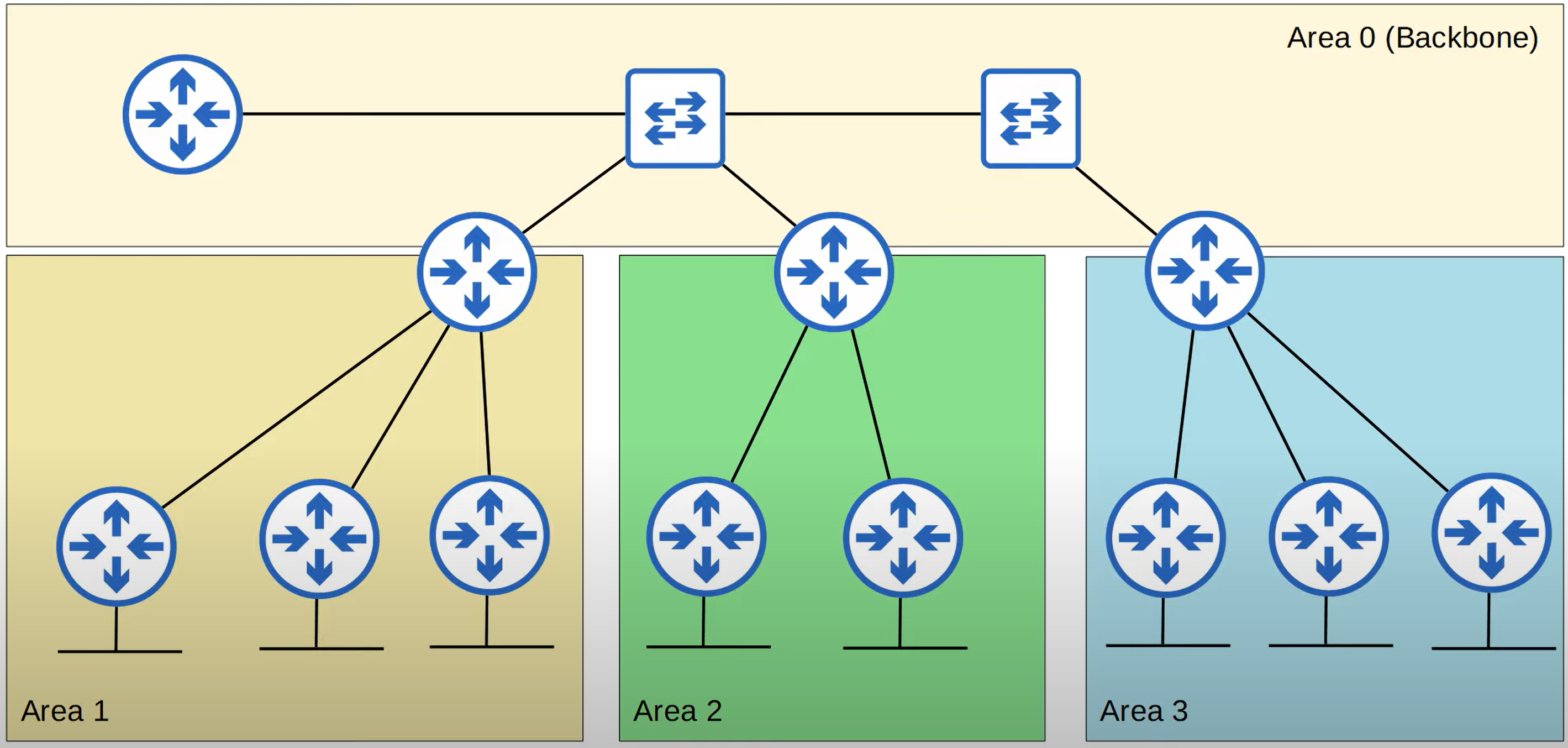
OSPF uses the concept of areas to divide the network. Small networks can be in one single area without any negative impact on performance but the larger ones should be divided. Otherwise, it takes a lot of time and processing power to calculate routes, more memory is required for LSDB and any small change in the network causes every router to flood LSAs.
An **area** is a set of routers that share the same LSDB. Area 0 (zero) is known as the **Backbone Area** that all other areas must directly connect to. Routers with all interfaces in the same area are called **internal routers**. Routers with interfaces in multiple areas are called **area border routers** (ABRs). ABRs maintain a separate LSDB for each area they are connected to. The recommendation is to connect an ABR to a maximum of 2 areas. Routers connected to the backbone area are called backbone routers. An **intra-area route** is a route to a destination inside the same area. An **interarea route** is a route to a destination in a different area.
#### Area Rules
* OSPF areas should be contiguous (joined)
* All OSPF areas must have at least one ABR connected to the backbone area
* OSPF interfaces in the same subnet must be in the same area
#### Configuration
To enter OSPF config mode, from the global config mode use the command `router ospf` followed by the process ID. Routers with different process IDs can be OSPF neighbours. The next command is `network`, the same as in EIGRP. OSPF also uses wildcard masks. But after the mask, you have to specify the area as well, e.g. `network 10.0.12.0 0.0.0.3 area 0`. The `passive-interface` and `default-information originate` commands are also the same as in RIP and EIGRP.
The `show ip protocols` command displays the following information.
**Router ID** order of priority:
1. Manual configuration
2. The highest IP address on a loopback interface
3. The highest IP address on a physical interface
To manually configure the router ID, enter the OSPF config mode and use the command `router-id` followed by the ID you want to use. After that reload or enter `clear ip ospf process` command from the privileged EXEC mode.
An **autonomous system boundary router** (ASBR) is an OSPF router that connects the OSPF network to an external network. When the `default-information originate` command is entered on a router, the router becomes an ASBR.
The maximum number of paths is 4 by default. To change it, enter the router config mode and use the command `maximum-paths` followed by the number. The same with AD. It is 110 by default. The command to configure it is `distance` followed by the number.
{% file src="/files/keRqKdJWUG3AQhJyyQJO" %}
{% file src="/files/wXBv9VRWYEMcoHbXRFwp" %}
{% embed url="" %}